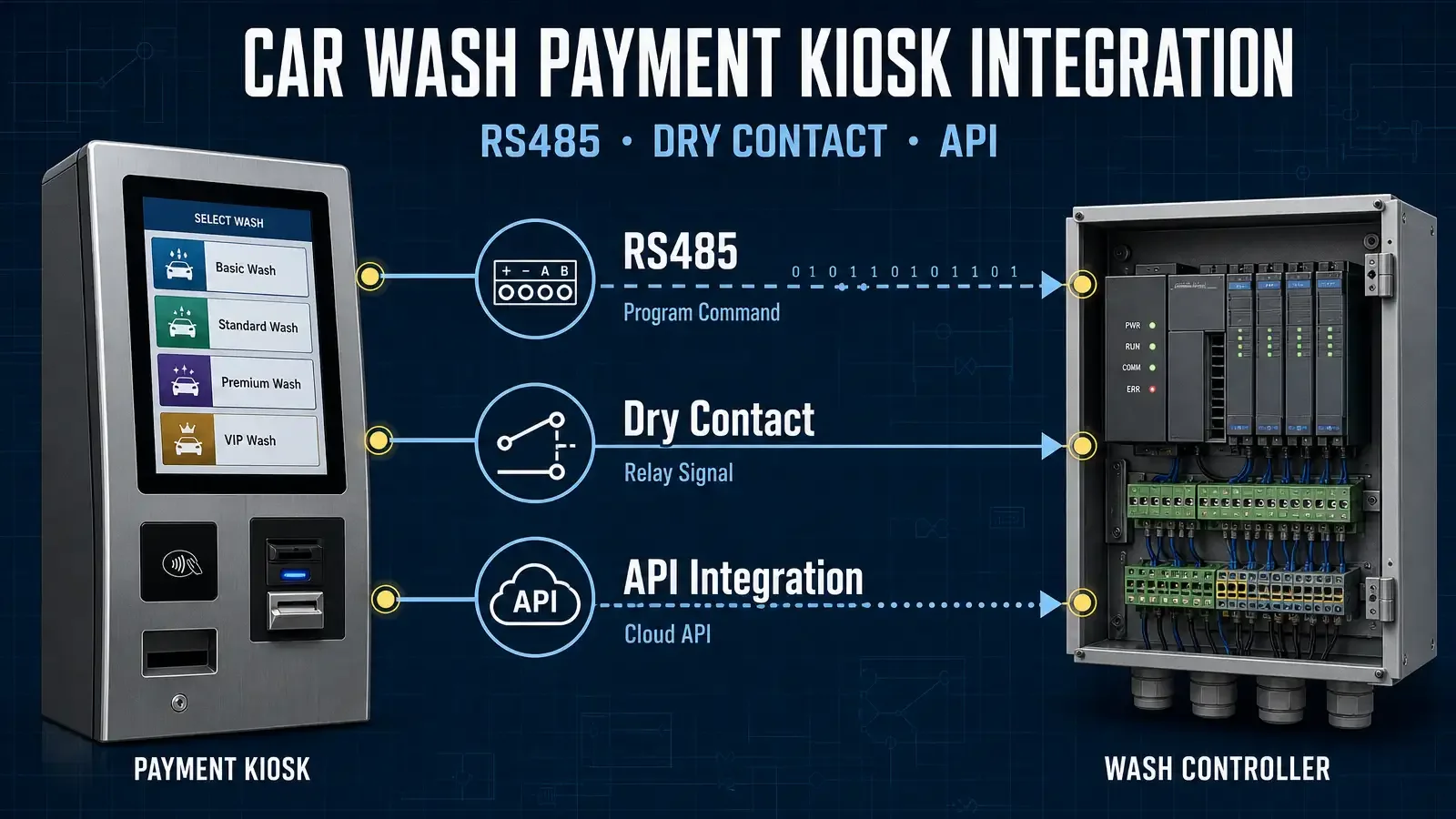
A car wash payment kiosk does not start the wash machine simply because a payment has been completed.
After the customer selects a wash program and pays, the kiosk still needs to tell the existing car wash controller which wash program the customer selected and which command should be sent to the wash controller.
In CRTLY car wash projects, this controller connection is typically handled in one of three ways:
For the hardware and deployment context, see our car wash payment kiosk application.
- RS485 communication
- Dry-contact relay control
- Project-specific HTTP API integration
RS485 and dry-contact integration are already used in current CRTLY projects.
HTTP API integration is different. It is not a standard preconfigured function in the current car wash software, but the software can be adapted when the customer or equipment supplier provides usable API documentation.
The integration method normally depends on the interface already available on the customer's wash controller.
For how card, NFC and QR payment modules communicate with the kiosk software itself, see our kiosk payment module integration guide.
The First Question Is: How Does the Wash Controller Accept a Program Command?
Before configuring the payment terminal, we first need to understand the car wash controller.
For most projects, the useful information includes:
- controller model;
- number of wash programs;
- available communication interface;
- how each program is started;
- whether the machine can return operating status.
For RS485 projects, the equipment manufacturer normally provides a communication protocol.
For dry-contact projects, they normally provide a terminal or wiring diagram.
For an API-based project, they need to provide the API documentation, authentication method and command definitions.
This information determines how the kiosk software maps a customer's selected wash package to the actual machine command.
For the complete customer journey from wash-program selection and payment to wash activation, see the car wash payment solution.
RS485 Integration: The Wash Program Is Mapped to a Controller Command
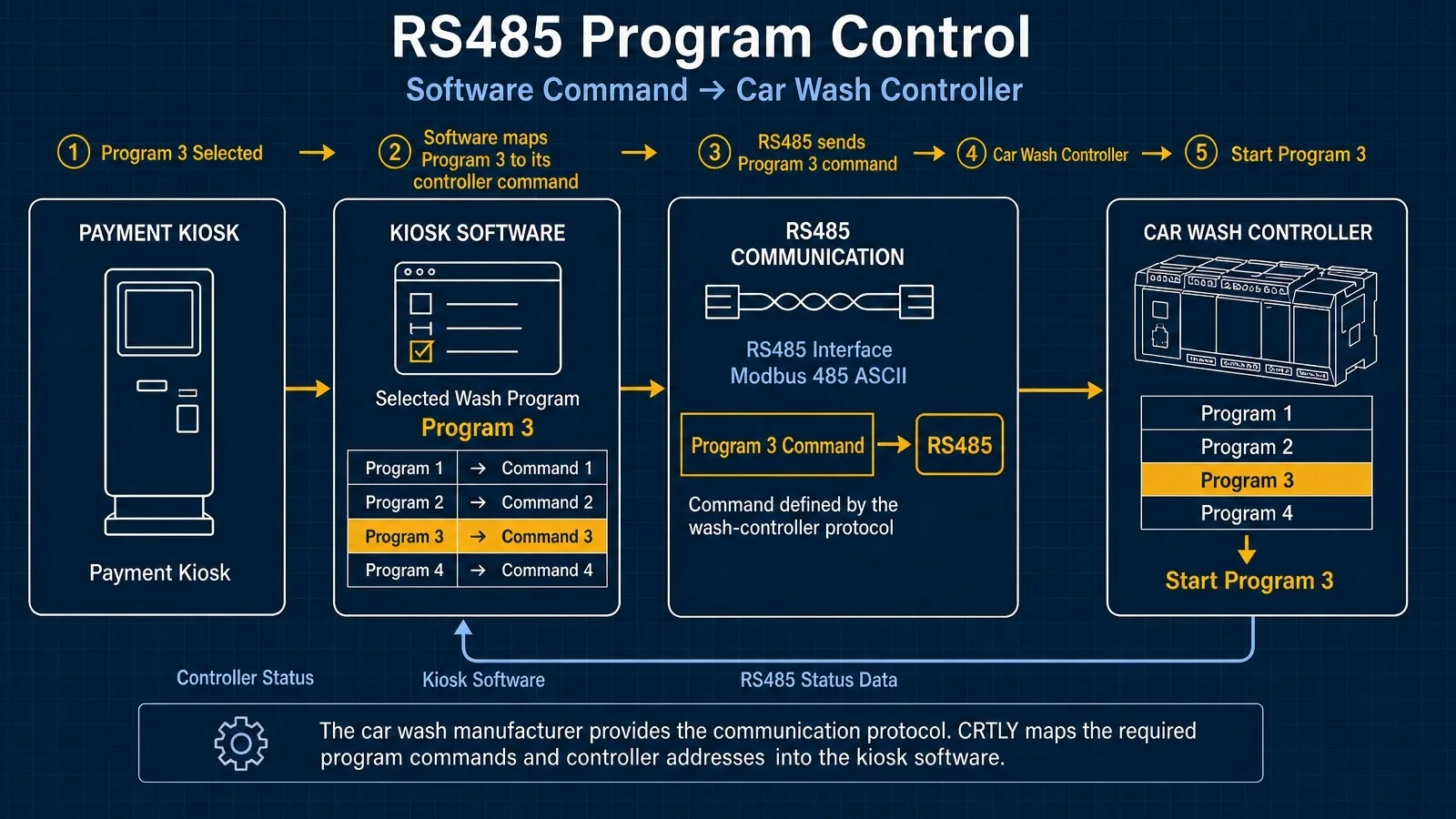
In an RS485 project, the kiosk communicates with the car wash controller through the communication protocol provided by the equipment manufacturer.
One controller used in a CRTLY project communicates through Modbus 485 ASCII at 9600 baud, with 7 data bits, 1 stop bit, even parity and controller address.
More importantly, the protocol defines separate commands and controller addresses for different wash modes, such as Mode 1, Mode 2, Mode 3 and Mode 4.
CRTLY maps those controller-defined commands to the corresponding wash programs in the kiosk software.
| Kiosk Wash Package | Controller Instruction |
|---|---|
| Program 1 | Mode 1 command |
| Program 2 | Mode 2 command |
| Program 3 | Mode 3 command |
| Program 4 | Mode 4 command |
The exact command and address depend on the wash controller and must come from the manufacturer's communication protocol.
What Happens After a Customer Selects Program 3?
Assume the customer selects Program 3.
The kiosk software keeps Program 3 as part of the current order.
The customer then completes payment.
After the payment result is confirmed, the kiosk retrieves the RS485 instruction assigned to Program 3 and sends it to the car wash controller.
The sequence is:
Program 3 selected
→ payment completed
→ payment result confirmed
→ kiosk software retrieves the Program 3 controller command
→ RS485 command sent
→ car wash controller receives Program 3 instruction
→ Program 3 starts
The payment module itself is not deciding which wash program should run.
That decision already exists in the kiosk order.
RS485 is the communication layer that transfers the selected program from the kiosk software to the wash controller.
Why the RS485 Protocol Is Required
A controller having an RS485 port does not mean that it can immediately communicate with the kiosk.
We still need to know what data to send.
The same controller protocol used in the project above defines separate instructions not only for different wash modes, but also for functions such as reset, pause and resume.
This is why, when a customer says:
“Our car wash machine supports RS485”
the next question is:
“Can you provide the communication protocol?”
The protocol tells us:
- communication settings;
- controller address;
- wash-program commands;
- register addresses;
- readable equipment states.
Without that document, the RS485 interface alone is not enough for software integration.
RS485 Can Also Return Equipment Status
The same RS485 connection can also be used to read controller information when the manufacturer exposes those states in the protocol.
For example, the protocol provided for this project includes readable information related to:
- whether the machine can accept another wash;
- whether a vehicle has arrived;
- wash-start / automatic status;
- fault status;
- wash completion;
- wash counters.
The protocol includes a readable status indicating whether another wash can be started after the previous vehicle has completed the wash cycle.
It also provides specific readings for vehicle arrival, operating state and fault status.
The kiosk software can use these raw controller values as part of its operating logic.
How those values are translated into customer-facing states such as Busy, Available and Fault is a separate software-control topic and is not expanded in this article.
Dry Contact Integration: The Program Is Mapped to a Relay Output
Some wash controllers use separate electrical inputs for different wash programs instead of a serial communication protocol.
In this type of project, the kiosk software controls GPIO outputs connected to relays, and each relay is wired to a corresponding program input on the car wash controller.
A four-program system can therefore be mapped like this:
Program 1 → GPIO Output 1 → Relay 1 → Controller Program 1
Program 2 → GPIO Output 2 → Relay 2 → Controller Program 2
Program 3 → GPIO Output 3 → Relay 3 → Controller Program 3
Program 4 → GPIO Output 4 → Relay 4 → Controller Program 4
The customer still selects a wash package and pays in the same way. The difference is that the selected program is transmitted through a physical relay output rather than an RS485 software command.
Example: Program 3 Through GPIO and Relay 3
Assume the customer selects Program 3.
After payment succeeds, the kiosk software activates the GPIO output assigned to Program 3.
That GPIO output controls Relay 3.
Relay 3 then closes the circuit connected to the Program 3 input on the wash controller.
The sequence is:
Program 3 selected
→ payment confirmed
→ GPIO Output 3 activated
→ Relay 3 operates
→ Controller Input 3 triggered
→ Program 3 starts
This is a physical I/O mapping rather than a software protocol command.
A Real Four-Program Dry-Contact Wiring Example
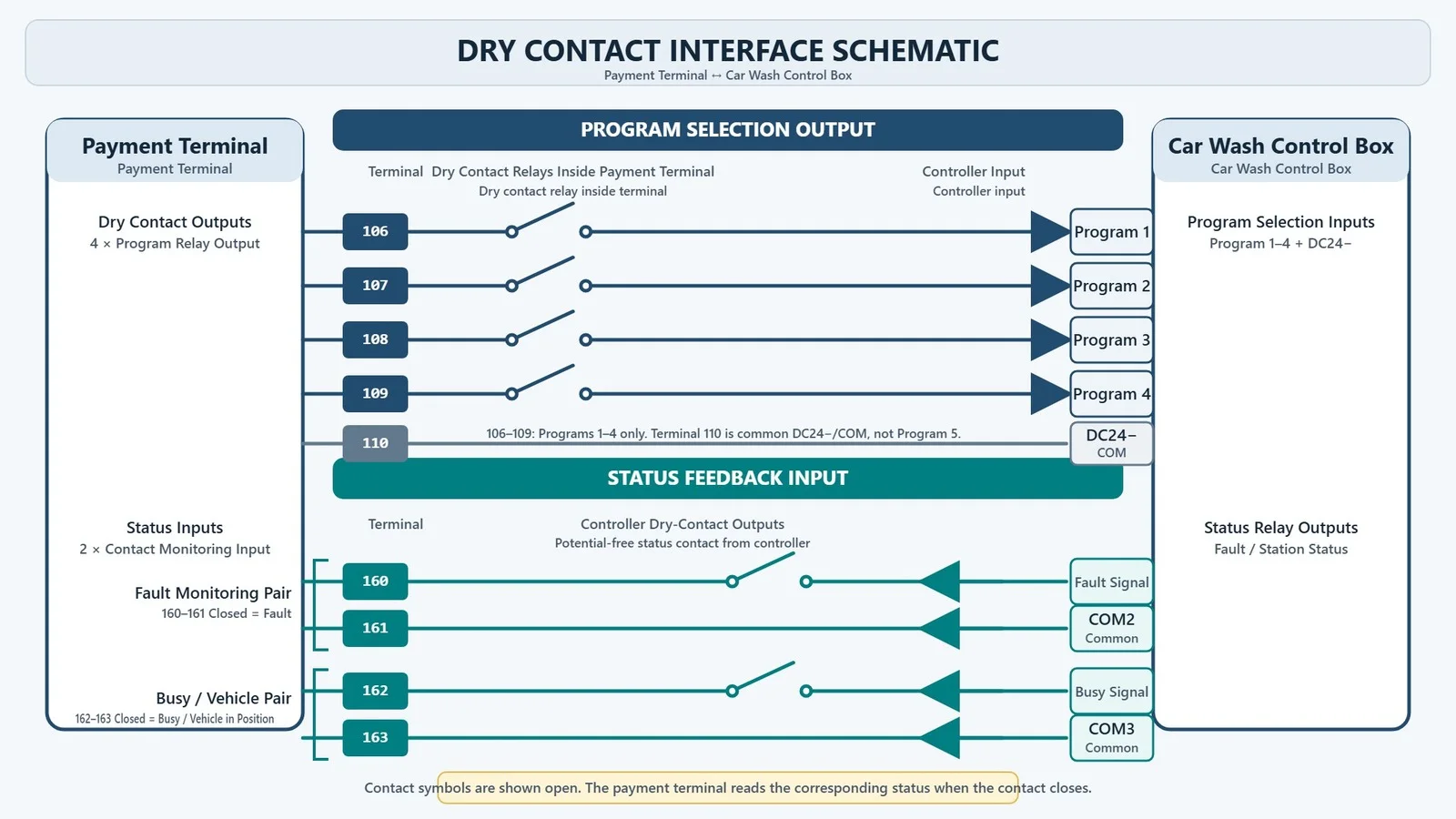
In one actual car wash integration, the controller provides separate terminals for four wash programs.
The wiring document defines:
- 106 → Program 1
- 107 → Program 2
- 108 → Program 3
- 109 → Program 4
- 110 → common terminal
When a customer selects a program and completes payment, the corresponding program contact closes with the common terminal.
For example, when Program 1 is purchased, terminal 106 closes with terminal 110 and forms the circuit required to start Program 1.
The same principle applies to the other program inputs.
This means that Program 3 can be mapped to the corresponding GPIO output and relay, which then closes the controller input assigned to Program 3.
The Relay Only Provides a Short Trigger
The relay does not necessarily remain active during the entire wash cycle.
In this project, the wash-controller documentation states that the program input lines are signal lines and should not carry voltage.
It also specifies that the signal only needs to remain active for approximately 1–5 seconds.
After that, the contact can open again and the wash controller continues the selected program by itself.
So the kiosk control logic is closer to:
activate relay
→ hold for the required trigger time
→ release relay
→ controller continues the wash cycle
The trigger duration must follow the actual controller documentation.
It should not be assumed or configured without checking the equipment requirements.
Dry Contact Can Also Return Fault and Busy Signals
Dry-contact integration is not necessarily output-only.
If the wash controller provides feedback contacts, the kiosk can also receive machine-state signals through GPIO inputs.
In the same real project, terminals 160 and 161 form one feedback pair for fault monitoring.
- 161 is COM2;
- 160 is the fault signal;
- when 160 closes with 161, the kiosk detects a fault condition.
Terminals 162 and 163 form another feedback pair for machine-status monitoring.
- 163 is COM3;
- 162 is the wash-machine status signal;
- when the machine is busy, 162 closes with 163 and forms the corresponding circuit.
The controller documentation confirms that the feedback wiring includes separate wash-status and alarm-status signals.
This allows the kiosk software to receive basic operating feedback even when the wash programs themselves are controlled through relays.
The detailed UI and payment behavior for Busy and Fault conditions will be covered separately.
A Third Integration Path: HTTP API
Some wash systems do not expose the required controller functions directly through RS485 or dry-contact terminals.
Instead, machine control is made available through a network API or cloud platform.
The architecture can look like this:
Kiosk Software
→ HTTP API
→ Cloud Platform / Gateway
→ PLC or Wash Controller
In this type of project, the kiosk software sends a network request after payment instead of sending a serial command or activating a relay.
For example:
Program 3 selected
→ payment confirmed
→ kiosk calls the equipment API
→ API writes the required command or control value
→ gateway / PLC receives the instruction
→ wash controller starts Program 3
The exact request depends entirely on the API provided by the wash equipment supplier.
What an API Integration May Require
A typical equipment API may include an authentication process for obtaining an access token, which is then used in subsequent authenticated requests.
It may also provide interfaces for writing values to device monitoring points through HTTP POST requests.
The request can identify the target monitoring point and write a specified value.
The same API may also provide methods for retrieving monitoring-point values and device connection status.
This means that an API-based project may involve:
- authentication;
- device identification;
- control-point identification;
- command/value mapping;
- response handling;
- equipment-status reading.
The exact implementation depends on the customer's API.
CRTLY's Current Status for HTTP API Integration
RS485 and dry-contact integration are already used in current CRTLY car wash projects.
HTTP API integration is not currently included as a standard function in our car wash kiosk software. If the customer or wash-equipment supplier provides complete API documentation, CRTLY can review the interface and adapt the software for the project.
HTTP API integration is handled as a project-specific software customization after technical evaluation of the customer's API.
RS485, Dry Contact and HTTP API Use Different Integration Methods
All three methods solve the same problem:
How does the kiosk send the selected wash program to the car wash equipment after payment?
RS485
Program 3 → Software Command 3 → RS485 → Controller → Start Program 3
Dry Contact
Program 3 → GPIO Output 3 → Relay 3 → Controller Input 3 → Start Program 3
HTTP API
Program 3 → API Command → Cloud / Gateway → PLC or Controller → Start Program 3
The customer sees the same user interface.
The integration behind the kiosk is what changes.
What Should the Customer Provide?
The fastest way to confirm the integration method is to provide the documentation from the wash-equipment manufacturer.
For RS485
Please provide:
- controller model;
- RS485 communication protocol;
- communication settings;
- program command definitions;
- register addresses;
- available status definitions.
For Dry Contact
Please provide:
- controller wiring diagram;
- program-input terminals;
- common terminal definition;
- required trigger duration;
- available feedback contacts;
- signal / voltage requirements.
For HTTP API
Please provide:
- API documentation;
- authentication method;
- API server information;
- device identifiers;
- wash-program command or control-point definitions;
- status endpoints or monitoring-point definitions, if available.
Once these materials are available, the integration path can be evaluated before the final kiosk software and I/O configuration are confirmed.
Which Integration Method Should Be Used?
The answer normally comes from the existing wash controller.
If the manufacturer provides an RS485 interface and a usable communication protocol, RS485 may be the appropriate integration path.
If the controller provides separate program inputs and a clear wiring diagram, dry-contact relay control may be more direct.
If control is exposed through a cloud platform or HTTP API, the project requires software-level API adaptation.
The objective is not to force every site to use the same interface.
The objective is to connect the kiosk to the controller method that the existing wash equipment actually supports.
If you are still comparing hardware, outdoor requirements, payment options and supplier considerations, see our outdoor car wash payment kiosk buying guide.
Frequently Asked Questions
Can a CRTLY car wash payment kiosk connect to an existing wash machine?
Yes, if the existing controller provides a usable integration interface and the required technical documentation is available. Current CRTLY car wash projects support RS485 and dry-contact integration. HTTP API integration can be evaluated as a project-specific software customization.
Can different wash packages start different programs?
Yes.
With RS485, different kiosk packages can be mapped to different controller commands.
With dry contact, different packages can be mapped to different GPIO and relay outputs.
With an API integration, the package can be mapped to the corresponding API command or control value defined by the equipment supplier.
Does an RS485 port mean the systems can connect immediately?
No.
The communication protocol is still required.
The RS485 port provides the physical communication channel, while the protocol defines the commands, addresses and data that the kiosk software must use.
Does the relay remain closed for the entire wash cycle?
Not necessarily.
In the project described above, the wash controller requires only a short 1–5 second trigger. After that, the relay can be released and the wash controller continues the program independently.
Can dry contact also provide machine-status feedback?
Yes, when the controller provides feedback contacts.
In the project example above, separate contact pairs are used for fault monitoring and machine busy status.
Does CRTLY currently support HTTP API integration as a standard feature?
Not as a standard preconfigured car wash function.
If the customer provides usable API documentation, CRTLY can evaluate the interface and modify the kiosk software for project-specific integration.
Final Takeaway
A car wash payment kiosk is not only a payment device.
After payment, it must translate the customer's selected wash package into a command that the existing wash controller can understand.
That command may be delivered through:
- an RS485 protocol;
- a GPIO-controlled dry-contact relay;
- or a project-specific HTTP API.
At the beginning of a car wash kiosk project, the first technical question should not be only about payment methods. It should also be about how the existing wash controller communicates and how each wash program is started.
Once the controller interface, program logic and technical documentation are confirmed, the kiosk software and I/O can be configured to match the existing wash equipment.