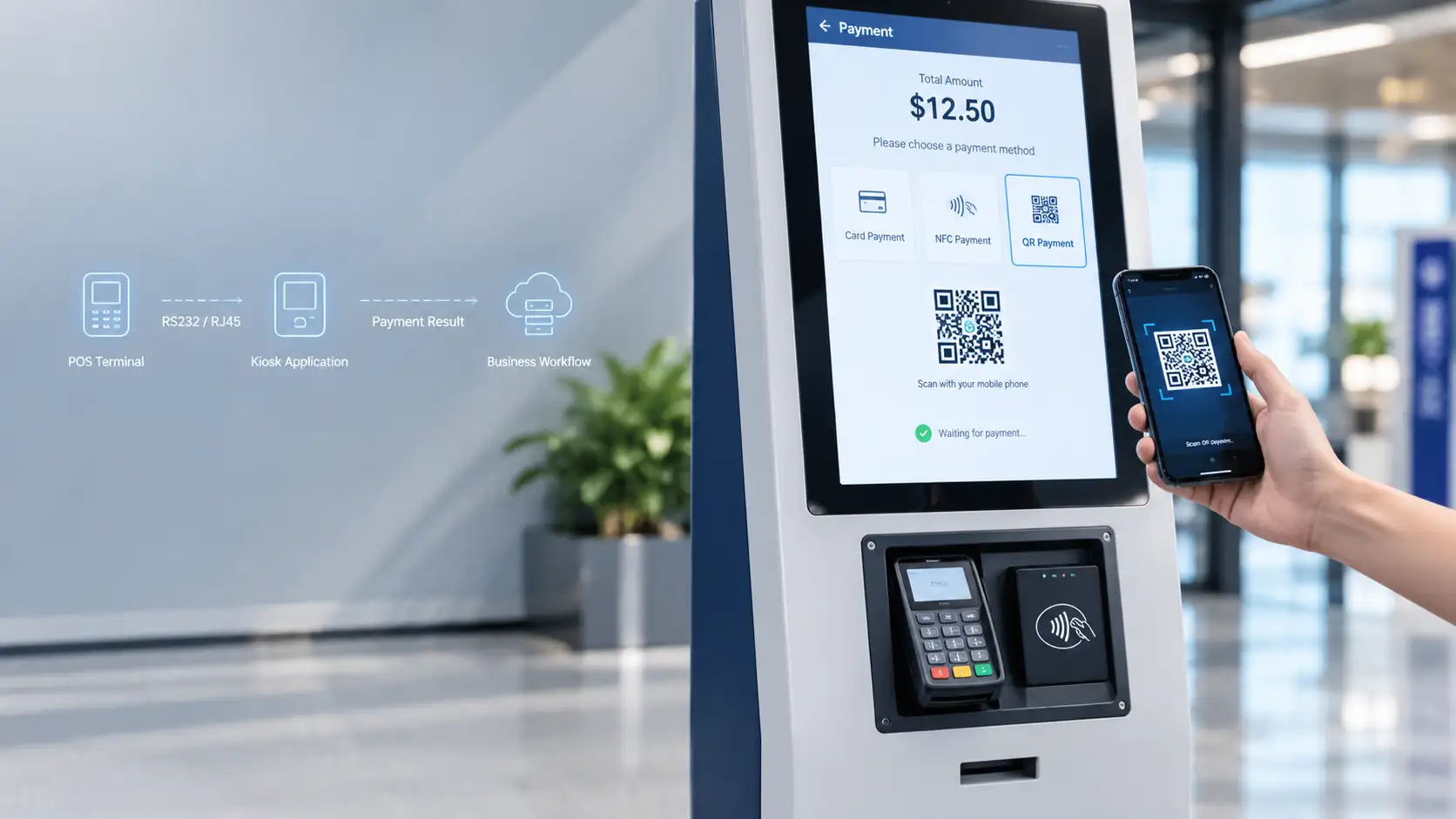
Payment integration in a self-service kiosk is more than installing a card terminal. The payment hardware, communication path, kiosk application, payment provider and business workflow have to work as one chain.
In CRTLY projects, payment integration normally starts with two questions: who provides the POS terminal, and whether CRTLY is responsible only for cabinet/interface preparation or also for software-level transaction integration.
CRTLY has completed software-level integration with NAYAX. For other POS brands or local payment platforms, the interface materials and project scope decide what can be delivered.
What Does Payment Integration Mean in a Self-Service Kiosk?
Payment integration connects the payment terminal, communication interface, kiosk application and business workflow so a successful transaction can trigger the intended service.
Mounting a POS in the cabinet is not enough. The kiosk application must receive a clear payment result — success, failure, cancellation or timeout — before the next service step runs. Without that handshake, the project is not integrated.
Card, NFC and QR Payments: What Is the Difference?
Card, NFC and QR can share one kiosk, but they are not the same hardware or software path. The method selected for the project changes terminal choice, UI flow and how payment results return to the kiosk.
Card / POS Terminal
A POS terminal is the normal path for card payment. Chip, contactless and PIN capability differ by terminal model, provider and country configuration — confirm them on the selected device rather than assuming a generic feature set.
In customer-supplied POS projects, CRTLY often treats the POS as an external device: we reserve the mounting position, modify the cabinet around the confirmed terminal dimensions and provide the required hardware interface. Software integration is not assumed unless it is included in the project scope.
NFC and Mobile Wallets
NFC for kiosk payment is normally the contactless capability inside the selected POS terminal, not a separate device that must always be added. Mobile wallets such as Apple Pay or Google Pay follow the terminal and payment-provider support for that market.
For metal kiosk enclosures, NFC performance must be checked after the final terminal position and metal opening are fixed. Metal around the reader area can reduce contactless performance, so the tap zone should not be treated as a purely cosmetic placement decision.
QR Payment
CRTLY's current implemented QR-payment path uses a QR code displayed on the kiosk screen for the customer to scan with a mobile phone.
The working flow is: kiosk calculates amount → payment QR is generated or displayed → customer scans with phone → payment provider processes payment → payment result returns to the kiosk → kiosk continues the business workflow.
QR payment architectures
| Model | User action | Kiosk requirement |
|---|---|---|
| A — Displayed QR | Customer scans the kiosk screen with a phone | Screen-side QR generation, refresh, expiry and confirmation UX |
| B — Customer-presented QR | Kiosk scanner reads a code on the phone | Barcode/QR scanner hardware plus scan-to-payment software flow |
CRTLY has implemented Model A in current projects. Model B is shown only as another possible industry architecture and is not being presented as a currently standardized CRTLY implementation.
Scheme characteristics (integration view)
| Method | User action | Integration focus |
|---|---|---|
| Chip & PIN | Insert card and enter PIN | PIN pad placement, privacy and terminal certification |
| Contactless card | Tap card on the reader | NFC zone clearance from metal bezels and display |
| Mobile wallet (NFC) | Tap phone or wearable | Terminal + provider wallet support in the target market |
| QR payment (CRTLY path) | Scan displayed QR on the kiosk screen | QR display, provider return status and confirmation timing |
Five Layers of Payment Terminal Integration
Payment terminal work on CRTLY projects moves through five layers: mechanical mounting, power, communication, software and business logic. Field “payment failures” often start in cabinet openings, cables or missing business-state binding — not only in the acquirer.
1. Mechanical Integration
Mechanical work covers terminal dimensions, panel opening size, mounting bracket, installation angle, user height, card insertion access, NFC tap area, PIN visibility, service access and cable routing.
For customer-provided POS terminals, cabinet design should not be finalized from a product photo or approximate size. CRTLY needs the exact model and final dimensions before the mounting opening and bracket are released for production.
Technical Note
NFC Antenna Placement
Antenna position relative to the display and metal bezel affects tap success. After the final opening is locked, contactless performance should be checked on the real metal cabinet — not only on a bench setup.
2. Power and Electrical Integration
Power work follows the selected terminal’s operating voltage, power input, connector routing and grounding or isolation requirements from the device documentation. Exact values come from the project terminal datasheet.
3. Communication Integration
Across CRTLY kiosk projects, common device interfaces include USB, RS232, RS485, RJ45, Wi-Fi, 4G and GPIO. For POS/payment communication specifically, RS232 and RJ45 are the two interfaces CRTLY most commonly encounters.
Hardware communication vs software materials
| Category | What CRTLY uses this for |
|---|---|
| Hardware communication | RS232 and RJ45 are the POS links CRTLY most often connects on the kiosk side |
| Software integration materials | API / SDK and protocol documentation when CRTLY must implement transaction software |
4. Software Integration
Software integration is the loop between the kiosk application and the payment side: the kiosk sends the transaction amount, the user pays, the result returns, and the kiosk updates the transaction state before the service continues.
Payment Request Flow
- 1
Kiosk calculates amount
- 2
Kiosk sends payment request
- 3
User completes payment
- 4
Terminal/provider returns result
- 5
Kiosk validates payment status
- 6
Business workflow continues
In CRTLY's NAYAX integration, the kiosk application can send the transaction amount to the payment side and receive the returned payment result. This has been used in real kiosk projects, including car-wash payment applications.
Technical Note
How CRTLY Handles Payment Failure Records
CRTLY's current payment workflow keeps the transaction ID and writes payment events to the system log so failed or abnormal transactions can be traced during support. Current standard handling does not automatically retry a failed payment transaction. A new payment attempt must follow the project-defined user flow rather than being described as an automatic retry mechanism.
5. Business Logic Integration
A successful payment result is not the end of the project by itself. After validation, the kiosk continues the workflow defined for that application.
Examples after payment confirmation
- Printing — release the print job
- Car wash — after a successful NAYAX payment result is returned, the kiosk software can continue the configured wash-control workflow
- Hotel — continue check-in or update the PMS workflow
- Parking — update the parking transaction or exit logic
- Restaurant — continue the order workflow
Related application workflows: self-service printing kiosk, car wash payment kiosk, parking payment kiosk and hotel kiosk.
Technical Note
PCI and certification boundary
Terminal certification, key injection and acquirer update rules constrain which devices and software paths can be used. PCI scope is set by how card data is handled and how the acquirer classifies the integration — CRTLY does not redefine that classification for every project.
Example: Integrating a NAYAX POS Terminal
CRTLY has completed NAYAX POS integration in real self-service kiosk projects, including car-wash payment kiosks.
In this integration, the kiosk application can send the transaction amount and receive the payment result. The returned result is then used by the kiosk software to decide whether the business workflow can continue.
The integration scope can include cabinet mounting position, power and cable routing, POS communication, transaction amount request, payment-result return and project-specific business logic.
NAYAX is a confirmed CRTLY integration path, not a statement that all POS brands use the same interface or software flow.
Can Local Payment Platforms Be Integrated?
CRTLY has received project requirements involving local payment platforms such as M-Pesa, MTN MoMo, Wave, Orange Money, Click and Payme, but these platforms are not currently presented as pre-integrated CRTLY payment options.
If a customer requires one of these payment methods, the payment provider or customer must first supply usable API / SDK / interface documentation. CRTLY can then evaluate the development, compilation, communication and test scope for that specific project. Compatibility should only be confirmed after technical evaluation and testing.
What CRTLY needs before evaluating a local payment provider
- API / SDK availability
- Documentation
- Sandbox / test account
- Merchant setup on the customer side
- Return-status mechanism
- Test environment
Payment Integration Responsibilities
CRTLY is not a payment processor or acquirer. Merchant accounts, acquiring and provider onboarding stay with the customer and the selected payment provider.
When CRTLY Provides the Payment Integration
- Kiosk cabinet and mounting
- Power and cable routing
- Supported POS communication on the kiosk side
- Kiosk-side transaction flow
- Business logic integration within the agreed scope
- Testing within the agreed scope
When the Customer Provides the POS
CRTLY default scope
- Reserve the mounting position
- Cabinet structural modification around the confirmed terminal dimensions
- Provide the agreed hardware interface, such as a serial connection
Customer / POS provider scope
- POS hardware
- Payment software
- Merchant account
- Acquiring
- Provider onboarding
- POS-side application and configuration
If the customer also asks CRTLY to implement software-level POS integration, that work needs a separate technical evaluation and quotation after the interface materials are available.
What Does CRTLY Need When a Customer Provides Their Own POS?
For a customer-provided POS project, CRTLY's default role is normally limited to cabinet preparation and hardware interface provision.
Cabinet-only integration
Before production, CRTLY needs
- Exact POS brand/model
- Final external dimensions
- Required mounting position
- Power requirement
- Required physical communication interface
Software-level integration
Only when CRTLY is asked to implement transaction software
- API / SDK
- Protocol documentation
- Test device
- Test account / sandbox if required
Technical Note
Quotation Boundary for Customer-Supplied POS
When the customer supplies the POS and only requires CRTLY to reserve the installation position, the quotation normally covers the cabinet structural modification related to that POS installation. POS software integration, payment-provider development or additional transaction logic is not automatically included in that scope. If software-level integration is required, CRTLY evaluates and quotes it separately after the necessary interface documentation is available.
Indoor vs Outdoor Payment Terminal Integration
Indoor projects focus on mounting access, user height, cable routing and service access. Outdoor POS work on CRTLY projects concentrates on three field issues that are often missed when only the kiosk enclosure rating is reviewed.
- POS terminal's own waterproof / IP rating — a weather-resistant kiosk cabinet does not automatically make the exposed POS terminal waterproof.
- Water sealing around the POS opening — the cabinet opening, terminal bezel and cable path need their own sealing treatment.
- NFC interference from metal — metal around the POS/NFC area can affect contactless performance after the final opening is fixed.
Common Payment Integration Problems
1. Final POS model changes after the cabinet opening is designed. The opening, bracket and cable path then need rework before production or installation.
2. The customer expects software-level transaction integration, but the agreed scope only reserved a mounting position. Those are different work packages and different quotations.
3. API / SDK materials are unavailable when software integration is required. Without return-status documentation and a test path, CRTLY cannot close the software scope.
4. The POS works indoors, but the exposed outdoor installation is unsuitable because of waterproof rating, sealing or metal NFC interference.
5. A payment result is returned, but the kiosk business logic is not correctly linked to the transaction state — so the service step after payment never starts.
Before CRTLY Quotes a Payment Integration Project
A. Customer-supplied POS, cabinet-only
- POS brand/model
- Dimensions
- Mounting position
- Power requirement
- Interface requirement
- Indoor / outdoor
- Quantity
B. CRTLY software / payment integration required
Additional materials
- Payment provider
- API / SDK
- Protocol documentation
- Required payment flow
- Success / failure return
- Test device
- Test environment if available