Technical Note
Quick Answer
Hotel self check-in can be deployed in two main ways. A fully integrated kiosk connects directly to the hotel PMS, payment and room-access systems and automates most of the guest journey. A live-agent model takes a different approach: the kiosk handles the guest-facing hardware and workflow, while a remote agent uses the hotel's authorized PMS access to retrieve reservations and complete the PMS-side check-in steps. This reduces the need for direct PMS API integration while preserving real-time human assistance.
Many hotel self check-in projects start with the assumption that the kiosk must be fully integrated with the hotel Property Management System (PMS).
That model can deliver a highly automated guest journey, but it also depends on available PMS interfaces, payment and room-access configuration, integration development and validation.
For hotels where direct PMS API integration is unavailable, expensive or too slow for the project timeline, a live-agent architecture provides another practical path.
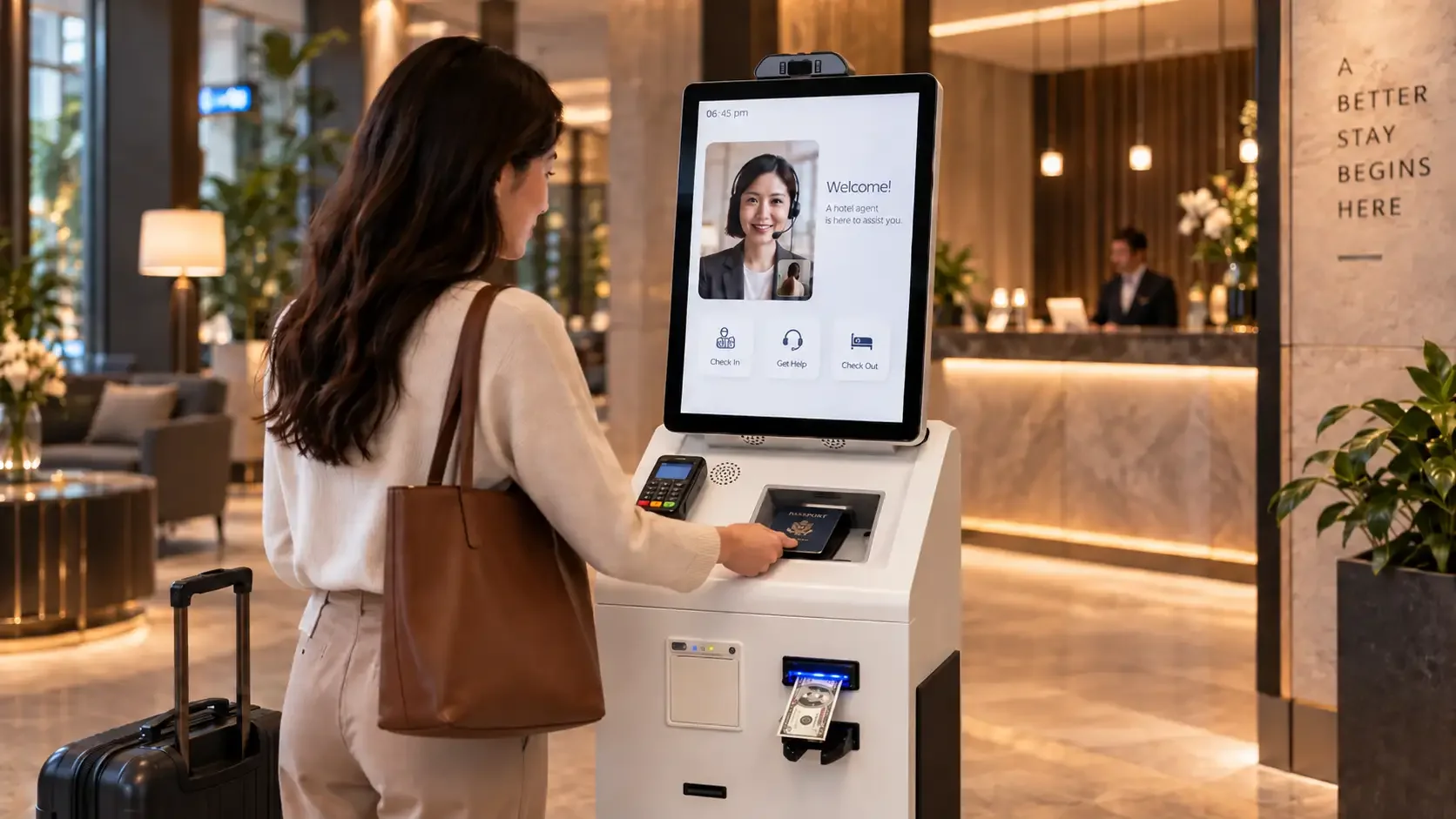
In this model, the guest still uses a self-service kiosk for identity capture, payment and room-card issuing, while a remote live agent operates the hotel's PMS with authorized access and guides the guest through the process in real time.
Two Ways to Deploy a Hotel Self Check-in Kiosk
Hotel self check-in projects commonly use one of two deployment models.
Neither model is universally better. The right choice depends on automation goals, PMS environment, staffing capacity and how much system integration the project can support.
Option 1 — PMS-Integrated Hotel Self Check-in
A fully integrated hotel kiosk connects directly with the hotel's PMS through an API, middleware or supported interface. The kiosk can retrieve reservations, verify guest information, process payment, synchronize check-in status and coordinate room-card or room-access issuance.
This model provides deeper automation, but each PMS, payment environment and room-access system may require integration, testing and deployment validation.
For a deeper look at the integrated architecture, see how hotel kiosks integrate with PMS systems.
Option 2 — Live-Agent Hotel Self Check-in Without Direct PMS Integration
The live-agent model removes the need for the kiosk software to communicate directly with the PMS API during the standard check-in workflow.
Instead, a remote service agent is given authorized access to the participating hotel's PMS environment. When a guest begins check-in at the kiosk, the agent can communicate with the guest through the kiosk camera, microphone and speaker, review the captured identity information, retrieve the reservation manually inside the PMS and complete the required PMS-side steps.
The kiosk continues to handle the guest-facing process, including passport or ID capture, payment, receipt printing and room-card issuing according to the configured project workflow.
Avoiding direct PMS API integration does not eliminate the need for other system configuration. If the kiosk issues room cards automatically, the room-card encoder or dispenser and related room-access workflow still need to be connected and configured for the project.
How the Live-Agent Hotel Check-in Workflow Works
A typical live-agent hotel check-in session combines guest-facing kiosk hardware with manual PMS operation by a remote agent.
Live-Agent Hotel Check-in
- 1
Start Check-in
The guest selects the preferred language and starts the check-in process from the kiosk.
- 2
Connect with a Live Agent
A remote agent joins the session through the kiosk camera, microphone and speaker and can communicate directly with the guest throughout the process.
- 3
Scan Passport or ID
The guest scans a passport or supported identity document. The kiosk can use a passport / ID reader with OCR to capture the identity information required for the hotel workflow.
- 4
Retrieve the Reservation in the PMS
Using authorized access provided for the participating hotel, the live agent operates the hotel's PMS and manually retrieves the guest reservation or stay information.
- 5
Verify Check-in Details
The agent confirms the reservation, identity information and required stay details with the guest.
- 6
Complete Payment
The guest completes payment through the kiosk's configured payment hardware. Depending on the project, this may include card payment and configurable cash-payment hardware such as a banknote acceptor.
- 7
Issue Room Card and Receipt
After the required payment and PMS-side steps are completed, the kiosk can encode and dispense the physical room card and print the receipt according to the configured room-access workflow.
- 8
Complete Check-in
The agent completes the required PMS-side check-in operation and confirms that the guest can proceed to the room.
Why Use a Live-Agent Model?
A live-agent architecture is useful when the project needs self-service hardware without committing to deep PMS-specific API development for every participating hotel.
Reduces Direct PMS Integration Requirements
Different hotels use different PMS platforms. When a suitable API is unavailable, the API cost is high or the development cycle is longer than the project allows, a live-agent model can avoid deep PMS API integration for the standard check-in workflow.
This can reduce the need for PMS-specific API development across multiple hotel environments.
Preserves Human Interaction
Through the camera, microphone and speaker, guests can communicate with a real person in real time.
This is especially useful for international guests, late-night check-in, unfamiliar booking situations and guests who need assistance during identity capture, payment or room-card issuing.
Centralized Support for Multiple Hotels
A centralized remote service team can support multiple hotel properties from another city, region or country. Operators can organize staffing around language coverage, time zones and operating costs rather than maintaining the same staffing level at every property.
Easier Coverage Across Different PMS Environments
Because the standard live-agent workflow does not require a dedicated API for every PMS, the same guest-facing kiosk approach can support a wider range of hotel PMS environments.
It does not mean the model works with every PMS without operational preparation. Authorized access, hotel procedures and agent training still need to be defined for each participating property.
Hardware Behind a Live-Agent Hotel Check-in Kiosk
Even without direct PMS API integration, the kiosk still depends on reliable guest-facing hardware and project-specific configuration.
Passport / ID Scanner with OCR
The kiosk can integrate a passport or ID reader with OCR to capture guest identity information before or during the live-agent workflow.
For document-capture details, see Passport OCR Kiosk Integration for Hotel Check-in.
Camera, Microphone and Speaker
These components allow the remote agent and guest to communicate in real time. The live agent can guide the guest through the full check-in process rather than appearing only when an exception occurs.
Payment Hardware
The kiosk can support configured card-payment hardware and, where required, cash-payment hardware such as a banknote acceptor. The exact payment configuration depends on the hotel project and local payment environment.
Room Card Encoder / Dispenser
After the required PMS and payment steps are completed, the kiosk can encode and dispense a physical room card according to the configured room-access workflow.
Receipt Printer
A receipt printer can print a receipt, check-in confirmation or other configured hotel documents according to the project workflow.
Accessibility Hardware
The kiosk can be configured with a tactile keypad with Braille markings and an audio interface for accessibility applications. These hardware options can support hotel projects with accessibility requirements, depending on the final kiosk configuration and installation.
Live-Agent vs PMS-Integrated Hotel Self Check-in
The table below summarizes how the two common deployment models differ. Neither column is automatically better for every hotel project.
| Attribute | PMS-Integrated Kiosk | Live-Agent Kiosk |
|---|---|---|
| PMS Connection | Direct PMS API / middleware / supported interface | No direct PMS API required for the standard live-agent workflow |
| PMS Operation | Automated by kiosk software and integration logic | Remote agent manually operates the hotel's PMS |
| Guest Interaction | Primarily self-service | Real-time interaction with a live agent |
| Passport / ID | Kiosk scanner / OCR integrated into automated workflow | Kiosk scanner / OCR with live-agent-assisted verification |
| Payment | Kiosk payment workflow | Kiosk payment workflow |
| Room Card | Automated room-card encoding / issuing according to integrated workflow | Kiosk room-card issuing after required agent-assisted PMS and payment steps |
| PMS-specific Integration | Required | Reduced |
| Initial Integration Complexity | Higher | Lower |
| Human Staffing | Lower ongoing human involvement | Requires remote agent coverage |
| Multi-property Operation | Depends on integrated systems | Centralized agents can support multiple participating hotels |
Which Hotel Check-in Architecture Should You Choose?
Choose PMS-Integrated Check-in When:
- high automation is the priority
- PMS APIs or supported interfaces are available
- the hotel wants minimal human involvement in routine check-in
- the project supports deeper integration and testing
Choose Live-Agent Check-in When:
- direct PMS API integration is unavailable or expensive
- the project needs to support multiple PMS environments
- real-time human assistance is valuable
- centralized remote staffing is acceptable
- the hotel wants to reduce PMS-specific integration effort
Related CRTLY Pages
For hotel lobby hardware use cases, see the Hotel Self-Service Kiosk Application. For the complete check-in system overview, see the Hotel Self Check-in Solution.
Knowledge Summary
Key Takeaways
- Hotel self check-in can use either direct PMS integration or a live-agent-assisted architecture.
- A live-agent model reduces the need for direct PMS API integration by allowing an authorized remote agent to operate the PMS.
- The kiosk still handles guest-facing functions such as passport / ID capture, payment, receipt printing and room-card issuing.
- Camera, microphone and speaker allow the agent to remain part of the guest journey in real time.
- Centralized remote agents can support multiple participating hotel properties.
- The best architecture depends on automation goals, PMS environment, staffing model and integration requirements.
Industry Tips
- Confirm whether the hotel PMS environment supports API integration or whether a live-agent workflow is more practical.
- Plan remote-agent coverage for language needs, night arrivals and peak check-in windows.
- Treat room-card encoding and payment hardware as project-specific configurations even when PMS API integration is reduced.
Integration Notes
- No direct PMS API integration for the standard live-agent workflow does not mean no hardware or room-access configuration is required.
- Passport / ID OCR, payment modules and room-card issuing remain guest-facing system components.
- Authorized PMS access for remote agents should follow the hotel's operating and security procedures.
Deployment Considerations
- Choose PMS-integrated check-in when high automation and available interfaces are priorities.
- Choose live-agent check-in when reducing PMS-specific API development is more important than full automation.
- Validate camera, audio and network quality for reliable live-agent communication before go-live.
Frequently Asked Questions
Does a live-agent hotel check-in kiosk require direct PMS API integration?+
No. In the standard live-agent workflow, the kiosk does not need to communicate directly with the PMS API. A remote agent uses authorized access to the hotel's PMS to retrieve the reservation and complete the required PMS-side check-in steps.
How does the live agent communicate with the guest?+
The kiosk can use a camera, microphone and speaker for real-time video and audio communication, allowing the agent to guide the guest throughout the check-in process.
Can the kiosk scan passports or IDs?+
Yes. The kiosk can integrate a passport or ID reader with OCR to capture guest identity information. The required document coverage depends on the selected reader, OCR technology and project requirements.
Can the kiosk issue a room card without direct PMS integration?+
Yes, provided the room-card encoder or room-access system is configured for the project. The live agent completes the required PMS-side steps, while the kiosk can continue with room-card encoding or dispensing according to the configured workflow.
Can the kiosk accept payment?+
Yes. The kiosk can support configured card-payment hardware and, where required, cash-payment hardware such as a banknote acceptor. The exact payment configuration depends on the hotel project.
Can one remote agent support more than one hotel?+
A centralized remote service team can support multiple participating hotel properties, depending on guest volume, operating procedures, language requirements and staffing capacity.
Does the kiosk support accessibility features?+
The kiosk can be configured with a tactile keypad with Braille markings and an audio interface for accessibility applications. Final accessibility compliance depends on the complete kiosk configuration, installation and applicable project requirements.