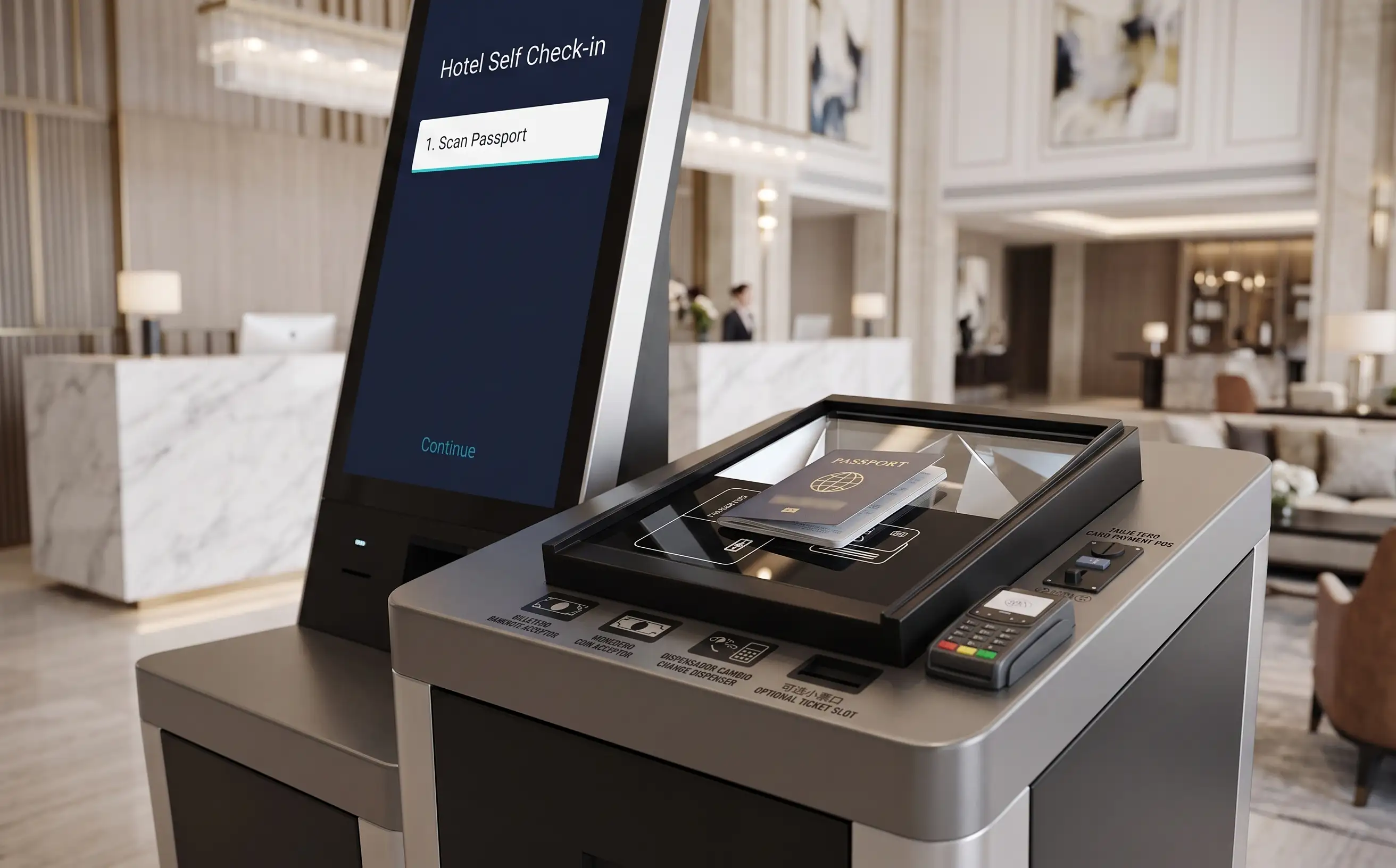
OCR Role in Hotel Check-in Automation
International guest check-in often requires passport or identity-document information before a stay can be completed. Entering those fields by hand at the front desk is slow and error-prone during peak arrival.
Hotel self-service kiosks commonly use a passport or ID reader with OCR / MRZ recognition so identity fields do not have to be retyped. The extracted data can then be validated and passed into the hotel workflow.
Passport OCR is only one part of hotel self-check-in. It is not a standalone hotel solution: reservation lookup, payment and room-card issuing still sit around it.
What Is Standardized in Passport Recognition
Compared with many local identity documents, international passports are relatively standardized. Most passports used for hotel check-in follow ICAO 9303 document and MRZ conventions, so the machine-readable zone can be captured in a consistent way across issuing countries. For hotel self-check-in, that shared MRZ layout is why a professional reader can usually extract name, document number, nationality and date of birth without a country-specific passport template.
Mainstream professional passport readers commonly support MRZ recognition. Many of these devices also use more than one imaging mode — typically RGB, infrared (IR) and ultraviolet (UV) — to improve readability when laminates, holograms or lobby lighting make a single visible-light image unreliable.
Because that baseline is widely available, the basic recognition function for a normal international passport is often not the biggest differentiator between professional reader vendors.
This does not mean that every passport reader is suitable for every hotel project. Damaged documents, unusual travel documents and local identity credentials may still require different recognition capabilities, document libraries or integration support.
For a hotel self-check-in project, reader selection should reflect the hotel's actual guest profile and document requirements. If most international guests check in with standard passports, there is usually a relatively broad range of professional passport readers to choose from.
If the property mainly serves domestic guests, or must also read national ID cards, residence permits or driver licenses, local document coverage becomes a much more important selection factor. Choosing a reader that already supports the documents commonly used in the target market is usually simpler than adding new templates, updating document libraries or developing custom recognition support later.
What Actually Differs Between Passport and ID Readers
On a typical international passport, professional document readers often look more similar than product brochures suggest. The larger project differences appear when the hotel also needs national ID cards, residence permits or driver licenses, or when the kiosk software has to talk to a specific SDK.
Areas that commonly affect a hotel self-check-in project include:
- MRZ recognition coverage and edge cases
- National ID card recognition
- Driver-license recognition
- Document template coverage
- OCR engine / document library
- SDK and API capability
- Operating-system support
- Update / customization capability
- Integration effort
Passports are relatively standardized. National IDs, residence permits and driver licenses can vary significantly by country and region — layout, fonts, security features and MRZ or barcode placement are not the same everywhere.
A useful example is U.S. driver’s licenses, which vary by state and by document version. A given reader or OCR engine may recognize some state licenses out of the box, fail on others, require a document-library update, or need additional template support or custom development. The same pattern appears with national ID cards when a hotel’s guest mix includes domestic as well as international travelers.
Depending on project requirements, hotel kiosk projects may use document readers or recognition technology from suppliers such as DESKO, Thales, Regula or Sinosecu. CRTLY does not select a passport reader only by brand name. Selection should depend on required document coverage, destination market, passport / ID / driver-license requirements, SDK / API availability, the kiosk operating system, physical integration into the enclosure, and project budget.
No brand ranking is useful here. Recognition rates, country counts and model-level claims should be verified against the actual document set and SDK for that hotel project.
Where Passport OCR Fits in a Hotel Self Check-in Workflow
The passport or ID reader is one step in the hotel self-check-in workflow, not the whole arrival process. After the reservation is available, the guest presents a document; after identity data is confirmed, payment and room-card issuing can continue. A typical self-service sequence is:
- Guest starts check-in
- Reservation is retrieved
- Guest scans passport / ID
- OCR extracts identity fields
- Guest confirms extracted information
- PMS matches or updates guest information
- Identity / hotel policy verification is completed
- Payment and room-card issuing continue
After identity data is captured and validated, the kiosk can use PMS integration to match the reservation and synchronize the check-in workflow.
How Passport Data Is Validated and Mapped to the PMS
An OCR result should not simply be treated as raw text written into the hotel PMS. Typical integration follows a short sequence: extraction, validation, normalization, field mapping, then handoff through the PMS API or middleware.
The table below shows common identity fields. Field mapping depends on the PMS API, middleware architecture and individual project configuration — not every PMS uses the same data fields.
| Field | OCR Output | Validation / Normalization | PMS Guest Profile Field |
|---|---|---|---|
| Full name | Parsed given name and surname from MRZ | Trim, character set and name-order rules | Guest name / profile name |
| Passport number | Document number string | Format and check-digit rules by issuing country | Passport or ID number |
| Nationality | ISO nationality code | Map to the PMS country or nationality list | Nationality |
| Date of birth | MRZ date value | Convert date format to the PMS date type | Date of birth |
| Expiry date | MRZ expiry date | Reject expired documents according to hotel policy | Document expiry |
| Document type | Passport or ID class | Map to the PMS document-type value | Document type |
What Happens When a Document Cannot Be Recognized
Unrecognized documents should never silently produce blank or incorrect PMS data. The kiosk should enter an explicit fallback workflow instead of continuing check-in with empty identity fields.
Common causes include low OCR confidence, a damaged passport or card, incorrect positioning, a partial MRZ capture, an unsupported document type, or a document library that does not cover a local ID or driver license. The first response is usually a controlled retry: flatten the page, uncover the MRZ, hold still, and attempt the read again.
If the document still cannot be recognized, the workflow can offer manual entry where hotel policy allows it, staff assistance at the front desk, or remote assistance without restarting reservation lookup. In some projects, a software or OCR-library update, or project-specific template support, may be required. Depending on the OCR engine, available SDK and document type, additional support or customization may be needed — it is not assumed that every document type can be added for every reader.
Hardware and Deployment Considerations
Once the reader is installed in the kiosk, physical layout matters as much as the OCR engine. Hotel self-service kiosks typically include a dedicated passport or ID scanner in the enclosure, with a recessed window and physical guides so a standing guest can seat the document without covering the MRZ. Scanner height, approach clearance and multilingual on-screen alignment graphics affect whether guests can complete the scan without staff.
Lobby lighting is rarely controlled. Mixed ceiling lights, window glare and reflective passport laminates all affect MRZ reading. A recessed scanner bay reduces stray light, but the kiosk UI still needs a clear positioning prompt and a short retry path before the guest is asked to confirm identity fields.
Accessibility and operations complete the same picture. Enclosure space, cable routing and operating-system support determine how the reader is mounted. If the scanner is offline, operators need a front-desk override or a remote agent who can continue identity capture. These hardware choices do not replace PMS connectivity; they determine whether identity data is captured cleanly enough to validate and hand off.