Technical Note
Quick Answer
A reliable outdoor payment kiosk depends on more than a weather-resistant enclosure. Long-term stability comes from coordinated industrial design, including enclosure materials, thermal management, airflow, drainage, sunlight-readable displays, protected payment hardware and maintainable dust filtration. Manufacturing quality also matters: standardized production processes, proven components and experienced assembly workers all influence how reliably a kiosk performs after years of outdoor operation.
Outdoor Environment Challenges
Unattended outdoor payment kiosks operate under conditions that are significantly more demanding than typical indoor self-service equipment.
Depending on the installation region, a kiosk may be exposed to extreme heat, sub-zero temperatures, high humidity, rain, dust, strong ultraviolet radiation and direct sunlight. In public or unattended locations, the cabinet must also withstand accidental impact and intentional vandalism.
These challenges are not limited to one industry. Outdoor payment kiosks can be used in car washes, parking facilities, recycling sites and many other unattended payment environments.
A stable outdoor payment kiosk starts with sound industrial design and disciplined manufacturing, not simply with a weather-resistant enclosure. Long-term reliability depends on whether the cabinet has a defined airflow and thermal-management path, effective drainage, appropriate material selection, proven components from established suppliers, consistent fabrication and assembly quality, standardized production procedures and workers experienced in outdoor kiosk manufacturing. These factors should be considered together from the design stage through final assembly and testing.
Enclosure Materials and Corrosion Resistance
Outdoor kiosk cabinets should be designed around the environmental exposure of the installation site rather than appearance alone.
Those cabinet choices belong to the same outdoor kiosk hardware decision as cooling, drainage, display configuration and payment-module layout.
Choosing Materials for Outdoor Kiosk Cabinets
Stainless steel is often the preferred enclosure material for outdoor payment kiosks because it provides stronger resistance to moisture, corrosion and long-term environmental exposure than ordinary untreated steel. However, properly treated galvanized steel can also be a practical choice for many outdoor kiosk projects when material thickness, surface preparation, coating and the installation environment are considered together.
Depending on structural and environmental requirements, materials such as 301 or 304 stainless steel can be considered. For locations with high humidity, coastal exposure or increased corrosion risk, material selection and surface treatment become particularly important.
The enclosure finish must also withstand prolonged ultraviolet exposure. Direct sunlight can gradually degrade paint and surface coatings, so outdoor-grade coating systems and proper surface preparation should be included in the cabinet design.
Key enclosure considerations
- Stainless-steel or properly protected galvanized-steel cabinet construction
- Outdoor-grade coating and surface treatment
- Waterproofing or controlled drainage around peripheral interfaces and user-access openings
Impact Resistance and Structural Design
Outdoor kiosks installed in unattended public locations must also withstand mechanical impact.
Depending on the deployment environment, enclosure design may target impact-resistance levels in the range of IK07 to IK10.
Achieving a higher IK rating is not simply a matter of increasing sheet-metal thickness. Cabinet geometry, internal reinforcement, door construction, hinges, locks and mounting points all contribute to overall structural strength.
Areas containing cash-handling devices normally require additional protection because banknote acceptors, coin modules and cash boxes may become targets for forced entry.
Structural design should consider
- Reinforced doors and access panels
- Anti-pry cabinet edges
- Industrial hinges and locking systems
- Protected payment-module mounting
- Reinforced mounting points
- Appropriate IK impact resistance for the installation environment
Thermal Management Inside an Outdoor Kiosk
Thermal management is one of the most important engineering differences between an indoor kiosk and an outdoor payment kiosk.
Large displays, industrial PCs, payment terminals, printers, bill acceptors and power supplies all generate heat inside the enclosure.
At the same time, sunlight can significantly increase the temperature of the cabinet itself.
Without a controlled airflow path, heat may accumulate around the display or electronic components even when ventilation fans are installed.
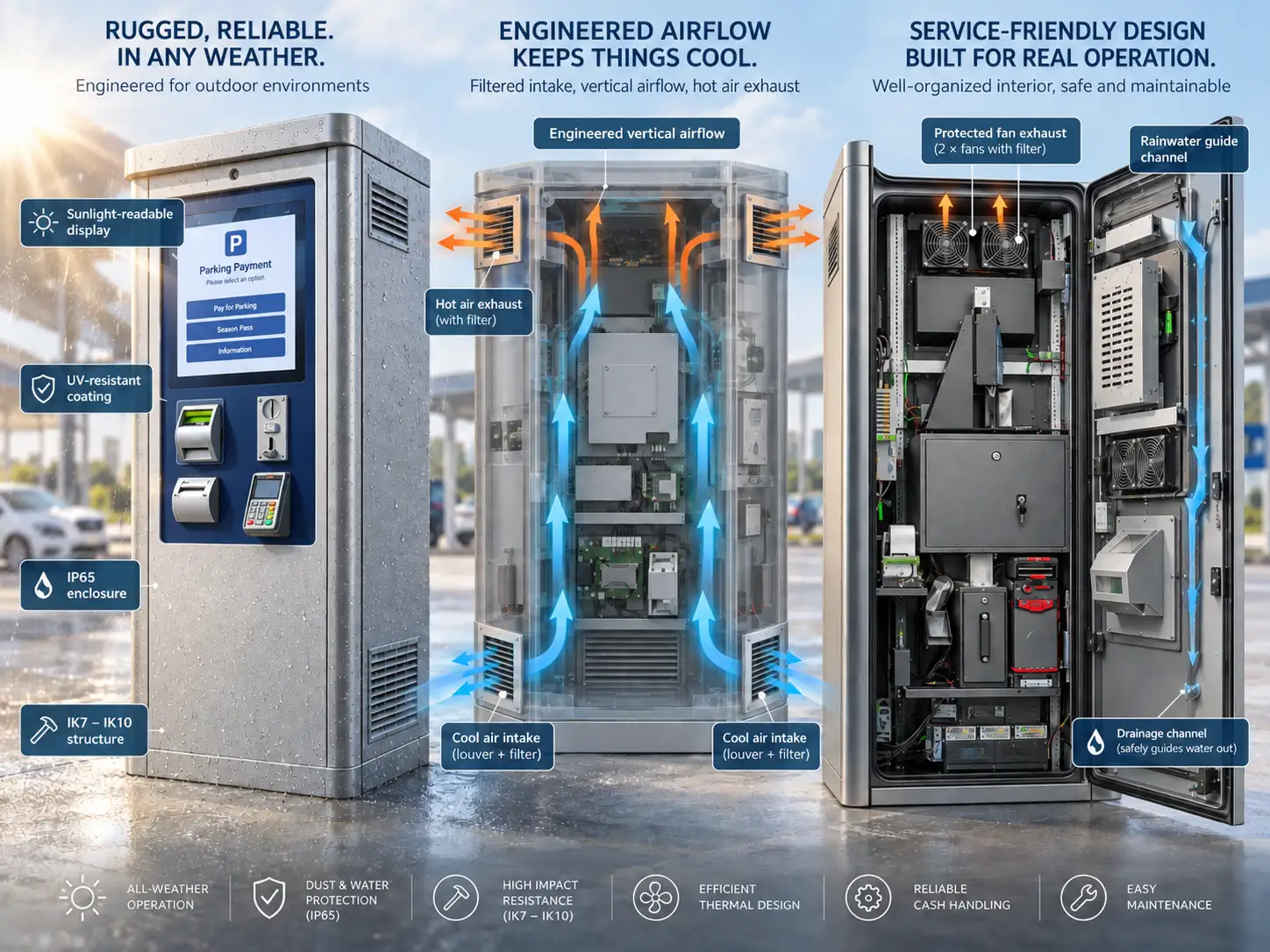
Bottom-to-Top Airflow Design
A properly designed forced-air cooling system should create a defined airflow path through the enclosure.
A typical approach is: cooler outside air enters through the lower part of the cabinet → air passes through heat-generating components → warm air is exhausted from the upper section.
This bottom-to-top airflow follows the natural tendency of heated air to rise and helps prevent hot-air recirculation inside the enclosure.
Simply cutting ventilation holes into a cabinet is not enough.
The positions of the following components should be considered together
- Air intake
- Exhaust vents
- Fans
- Internal partitions
- Display
- Industrial PC
- Power supply
- Payment modules
Forced-Air Cooling vs Air Conditioning
Forced-Air Cooling
Fans move outside air through a controlled ventilation path inside the enclosure. From a cost perspective, this is often the most economical cooling solution. However, forced-air cooling places greater demands on cabinet engineering and assembly quality. The enclosure must correctly manage airflow, dust, rainwater, filtration, drainage, fan placement and component positioning. A poorly designed fan-cooled cabinet can create local hot spots even when the total airflow appears sufficient.
Air-Conditioned Cooling
For extremely hot environments or installations with very high internal heat loads, cabinet air conditioning may be required. Air conditioning provides stronger thermal control, but it also increases equipment cost, power consumption, maintenance requirements and cabinet complexity.
Therefore, the cooling method should be selected according to the actual climate, internal heat load and installation environment rather than using the same solution for every project.
Water Protection and Internal Drainage
Outdoor kiosk waterproofing does not mean simply sealing every opening.
A cabinet that uses ventilation also needs controlled protection against wind-driven rain.
Air inlets and exhaust openings should therefore be designed so that rainwater cannot travel directly into sensitive electronic areas.
One practical approach is to combine:
- Protected louvers
- Indirect airflow paths
- Internal water barriers
- Drainage channels
- Controlled drainage outlets
If small amounts of water enter through ventilation areas during heavy rain, an internal drainage channel can guide the water safely away from electronic components and allow it to exit the enclosure.
This is especially important when forced-air cooling requires larger ventilation openings.
Technical Note
Separate the air path from the water path
Good drainage design separates the air path from the water path rather than assuming that the ventilation opening will always remain completely dry.
High-Brightness Displays for Direct Sunlight
A standard indoor display can become difficult or impossible to read when exposed to strong outdoor sunlight.
Outdoor payment kiosks therefore normally require high-brightness LCD panels.
Depending on screen size, installation orientation and expected sunlight exposure, outdoor kiosk displays may require brightness levels approximately in the range of 1000–3000 cd/m².
The required brightness generally increases as screen size and ambient-light exposure increase.
Optical Bonding for Outdoor Touchscreens
CRTLY outdoor touchscreen configurations use optical bonding where required for outdoor display applications.
Optical bonding removes the air gap between the LCD and front protective glass.
This can provide several benefits for outdoor installations:
- Reduced internal reflections
- Improved readability under strong ambient light
- Better visual contrast
- Reduced internal condensation risk
- Improved mechanical stability of the display stack
- Better thermal coupling between the LCD and front glass
Because outdoor high-brightness displays generate considerably more heat than standard indoor displays, thermal behaviour should be considered together with display brightness.
The screen should not be treated as an isolated component. It should be engineered together with enclosure airflow, front glass, touchscreen, sunlight load and the internal cooling system.
Payment Hardware in Outdoor Environments
Outdoor payment kiosks may support different combinations of:
- Banknote acceptors
- Coin acceptors
- Coin change dispensers
- Card payment terminals / POS
- Receipt printers
- QR or contactless payment devices
The exact configuration depends on the project.
Outdoor environments create additional requirements for these modules because payment devices often contain moving mechanisms, openings and user-accessible interfaces.
Banknote Acceptors
Require protected bill-entry areas, secure cash storage and service access.
Coin Acceptors and Change Dispensers
Need controlled internal positioning and convenient replenishment or cash-collection access.
Card Payment Terminals
Must be positioned for user accessibility while protecting cable connections and internal electronics.
Receipt Printers
Need protection against moisture while still allowing paper replacement and service access.
The cabinet therefore needs to balance weather protection, user accessibility, maintenance accessibility and cash security.
Designing for Different Climate Regions
There is no single outdoor kiosk configuration suitable for every country.
The engineering priorities change with the installation environment.
Hot and High-Sunlight Regions
- Solar heat gain
- Internal temperature
- High-brightness display
- UV exposure
- Ventilation capacity
Cold Regions
- Low-temperature startup
- LCD operating temperature
- Payment-device temperature
- Condensation
- Optional cabinet heating
High-Humidity or Rainy Regions
- Corrosion resistance
- Water ingress
- Drainage
- Sealed cable entry
- Condensation management
Dusty Environments
- Controlled air intake
- Effective dust filtration. Dust gradually accumulates around air-intake and exhaust areas during outdoor operation, so filter elements should be inspected and replaced at appropriate service intervals. Filter replacement should also be designed to be quick and convenient for maintenance personnel.
- Protection for moving mechanisms in banknote acceptors, coin modules and other payment devices
This is why outdoor kiosk engineering should start with the deployment environment, not simply with a standard cabinet drawing.
Outdoor Kiosk Design Is a System-Level Decision
A reliable outdoor payment kiosk is not created by adding a waterproof roof or a brighter screen to an indoor kiosk.
Its enclosure, display, payment devices, thermal system, drainage structure and maintenance access must be engineered as one system.
A change in one area often affects several others.
Example 01
Adding larger ventilation openings improves airflow, but also increases the need for rain protection and drainage.
Example 02
Increasing display brightness improves sunlight readability, but also increases heat generation and therefore affects cooling requirements.
These relationships should be considered during the cabinet design stage rather than after the kiosk has already been manufactured.
Cloud Monitoring for Unattended Sites
Operators managing unattended outdoor payment kiosks can use transaction logs, device-health data, temperature monitoring and fault alerts to identify problems before an on-site visit is required.
Remote monitoring can help correlate payment failures with events such as:
- Temperature thresholds
- Door-open events
- Payment-device faults
- Connectivity interruptions
- Printer or cash-module errors
Remote monitoring does not replace good cabinet engineering, but it can reduce unnecessary site visits and shorten fault-diagnosis time.
“Outdoor reliability is engineered at the cabinet, thermal, drainage and display layers — not added after deployment.”